Cloud-native infrastructure
Cloud-native infrastructure
Your infrastructure lives in three cloud accounts, two Kubernetes clusters, and a handful of Lambda functions that nobody has documented since the engineer who wrote them left. Your cloud console shows resources, but it does not show how they connect, who owns them, or what they cost the organisation. This schema gives you that visibility.
Cloud-Native Infrastructure maps the full cloud stack: from the accounts that own everything, through the clusters and namespaces that run your workloads, down to the individual deployments, functions, databases, and storage buckets your applications depend on. It extends Core Schema for organisational context (teams, people, vendors), so you get a unified view of both cloud resources and the humans responsible for them.
What you get
| Object Type | Purpose | Key Attributes |
|---|---|---|
| Cloud Account | AWS accounts, Azure subscriptions, GCP projects | Account ID, Provider, Environment, Monthly Spend, Cost Center |
| Kubernetes Cluster | Managed and self-managed K8s clusters | Provider (EKS/AKS/GKE), Version, Node Count, Region, GitOps Repo |
| Namespace | Logical workload boundaries within clusters | Cluster, Team Owner, CPU Quota, Memory Quota |
| Deployment | Kubernetes workloads (Deployments, StatefulSets) | Image, Replicas, CPU/Memory Limits, Registry |
| Container Registry | Image registries (ECR, ACR, GCR) | Provider, URL, Scan Policy |
| Serverless Function | Cloud functions (Lambda, Cloud Functions) | Runtime, Memory, Timeout, Trigger Type |
| Managed Database | Cloud-managed databases (RDS, Cloud SQL) | Engine, Version, Instance Type, Multi-AZ, Storage |
| Object Storage | S3, GCS, Azure Blob buckets | Versioning, Encryption, Public Access |
| CDN Distribution | Content delivery (CloudFront, CloudFlare) | Domain, Origin, SSL Certificate, Cache Policy |
| Service Mesh | Istio, Linkerd, Consul Connect | Type, Version, mTLS Status |
Pro tip: This schema extends Core Schema. Deploy Core first to get Person, Team, Application, Vendor, and Location objects, then deploy Cloud-Native Infrastructure on top. Cloud resources inherit organisational context through cross-schema references.
When to use this schema
Deploy Cloud-Native Infrastructure if your organisation:
-
Runs workloads across multiple cloud providers and needs a unified inventory
-
Operates Kubernetes clusters and needs to track namespaces, deployments, and service mesh configurations centrally
-
Needs cost attribution by team, project, or cost centre (FinOps)
-
Wants to enforce governance standards for cluster versions, registry scanning, and mTLS policies
-
Has three or more cloud accounts, or two or more Kubernetes clusters
Not quite right? If your infrastructure is on-premises (physical servers, network hardware, data centres), look at Standard CMDB or Enterprise IT CMDB. If you only need basic application and service tracking without cloud resource detail, Core Schema covers that. If your focus is software licence compliance rather than infrastructure, try Software Asset Management.
Schema at a glance
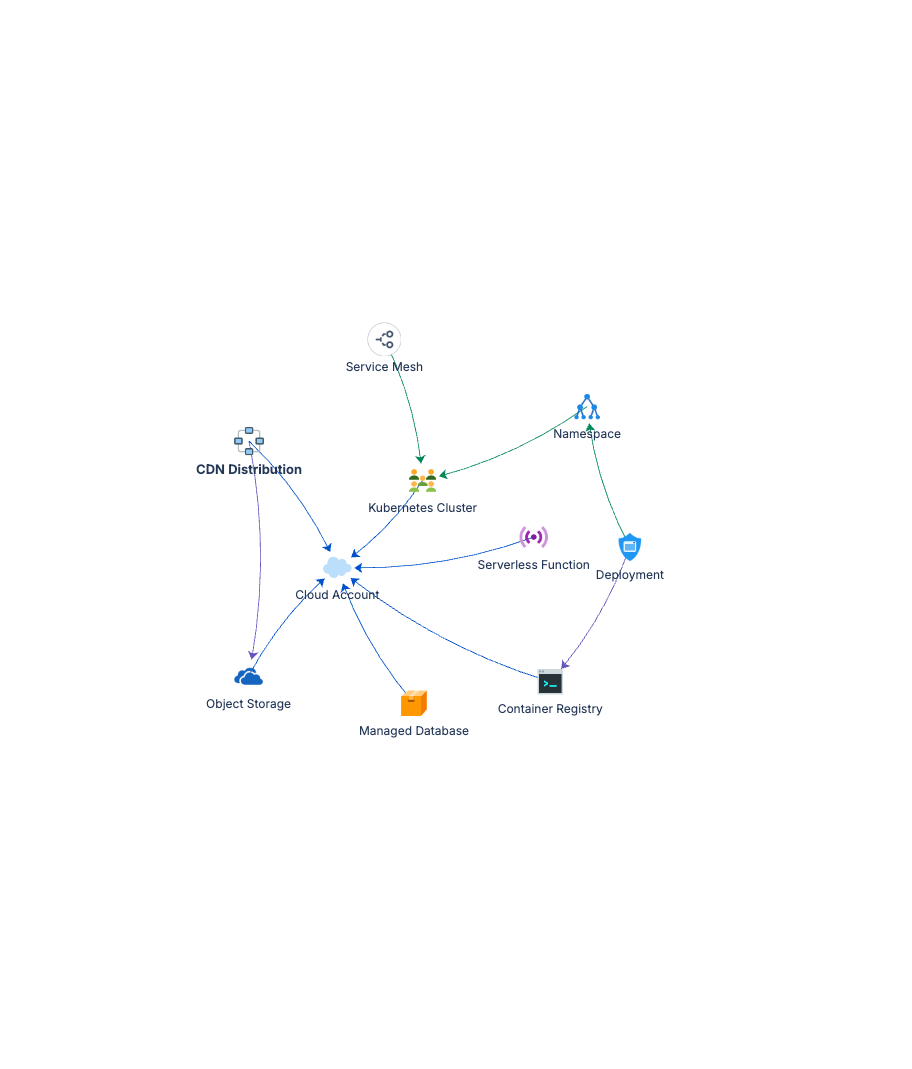
Cloud Account (AWS/Azure/GCP)
├── Kubernetes Cluster ──(Belongs To)──▶ Cloud Account
│   ├── Namespace ──(Deployed In)──▶ Cluster
│   │   └── Deployment ──(Deployed In)──▶ Namespace
│   └── Service Mesh ──(Deployed In)──▶ Cluster
├── Container Registry ──(Belongs To)──▶ Cloud Account
├── Serverless Function ──(Belongs To)──▶ Cloud Account
├── Managed Database ──(Belongs To)──▶ Cloud Account
├── Object Storage ──(Belongs To)──▶ Cloud Account
├── CDN Distribution ──(Belongs To)──▶ Cloud Account
└── CDN Distribution ──(Uses)──▶ Object Storage
Reference types: Belongs To (blue, ownership hierarchy), Deployed In (green, where workloads run), Uses (purple, service dependencies).
Documentation
Quick Start Guide Deployment walkthrough for all ten object types. Covers cloud account hierarchy, Kubernetes resource relationships, multi-cloud integration patterns, and starter data for AWS, Azure, and GCP.
Governance Playbook Cloud resource lifecycle management, FinOps cost tracking practices, and review cadence for fast-changing cloud environments.
Forms Specification Form layouts for cloud accounts, clusters, deployments, functions, databases, storage, and related objects.