Standard CMDB
Standard CMDB
Your team manages servers, databases, network devices, cloud resources, and a growing list of applications. But when something breaks at 2 AM, can anyone quickly trace which services are affected, who owns the infrastructure, and what depends on what? The Standard CMDB gives you that picture.
Twelve object types covering the full breadth of IT infrastructure management. Hardware, software, cloud, services, people, vendors: all wired together with the relationships that make a CMDB genuinely useful rather than just an expensive spreadsheet.
What you get
| Object Type | Purpose | Key Attributes |
|---|---|---|
| Location | Physical sites, data centres, offices | Location Name, Location Type, Address, City, Country, Status |
| Vendor | External suppliers and service providers | Vendor Name, Vendor Type, Website, Support Email, Support Phone, Contract End Date, Status |
| Team | Functional groups that own services or assets | Team Name, Team Type, Email, Slack Channel, On-Call Rotation |
| Person | Staff and contacts responsible for infrastructure | Full Name, Email, Job Title, Department, Phone, Member Of, Location, Status |
| Business Service | IT services delivered to the organisation | Service Name, Service ID, Description, Criticality, Service Owner, Support Team, SLA, Status |
| Server | Physical and virtual machines | Hostname, IP Address, FQDN, Server Type, Operating System, OS Version, CPU Cores, RAM (GB), Storage (GB), Environment, Location, Vendor, Status |
| Database | Database instances and clusters | Database Name, Database Type, Version, Port, Size (GB), Environment, Hosted On, Backup Schedule, Status |
| Application | Software systems and services | Application Name, Application ID, Description, Version, Application Type, Technology Stack, Repository URL, Environment, Hosted On, Uses Database, Part Of Service, Status |
| Network Device | Switches, routers, firewalls, load balancers | Device Name, Device Type, IP Address, MAC Address, Manufacturer, Model, Firmware Version, Location, Status |
| Cloud Resource | Cloud instances, storage, and managed services | Resource Name, Resource ID, Cloud Provider, Resource Type, Region, Account/Subscription, Monthly Cost, Environment, Part Of Service, Status |
| Software License | Software licences and entitlements | License Name, License Key, License Type, Seats, Seats Used, Start Date, Expiry Date, Annual Cost, Vendor, For Application, Status |
| Document | Technical documentation and runbooks | Document Title, Document Type, URL, Last Updated, Related Service |
Every object type comes pre-configured with attributes, relationships, and sensible defaults. Deploy it, populate it, and you have a working CMDB that answers the questions your service desk asks every day: what runs on what, who owns it, and what breaks when something goes down.
Pro tip: You do not need to populate all 12 object types on day one. Start with servers, applications, and people. Add network devices, databases, and cloud resources as your team gets comfortable with the schema.
When to use this schema
Deploy the Standard CMDB if:
-
Your organisation runs a mix of physical and cloud infrastructure.
-
Multiple teams manage different service areas and you need cross-team visibility.
-
You need proper asset relationships beyond the basics (dependencies, ownership, service mapping).
-
You are tracking more than 100 assets and the Basic CMDB no longer covers your needs.
If you have a small environment (fewer than 100 assets, one team), the Basic CMDB will get you started faster. If you need additional domains like cybersecurity, vendor contracts, or workforce tracking, explore the Service model reference for specialist schemas that layer on top.
Not sure which schema fits? See Which Schema Should I Choose?
Schema at a glance
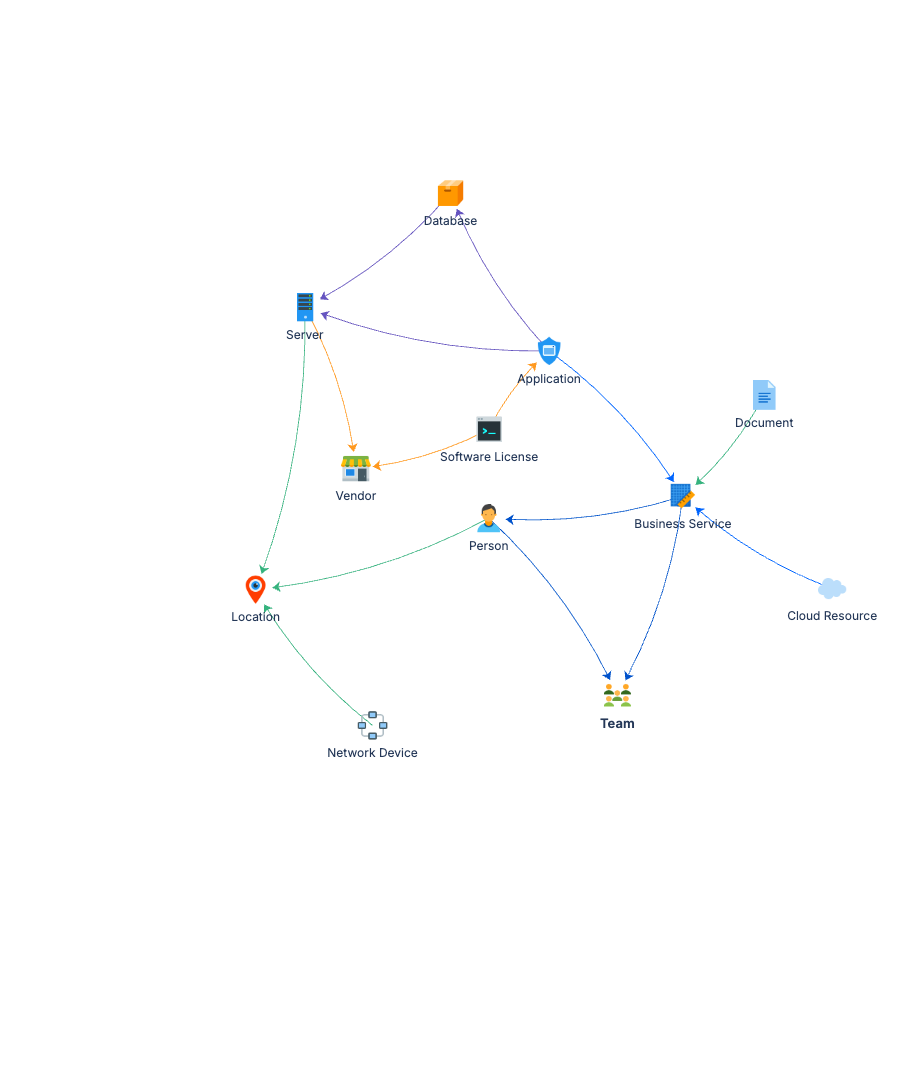
Person ──(Member Of)──▶ Team
Person ──(Located At)──▶ Location
Server ──(Located At)──▶ Location
Server ──(Supplied By)──▶ Vendor
Database ──(Hosted On)──▶ Server
Application ──(Hosted On)──▶ Server
Application ──(Uses Database)──▶ Database
Application ──(Part Of Service)──▶ Business Service
Cloud Resource ──(Part Of Service)──▶ Business Service
Business Service ──(Owned By)──▶ Person
Business Service ──(Supported By)──▶ Team
Software License ──(Supplied By)──▶ Vendor
Software License ──(Licensed For)──▶ Application
Network Device ──(Located At)──▶ Location
Document ──(Documents)──▶ Business Service
Twelve object types, richly connected. The relationship model means you can trace a failing server all the way up to affected business services and the people responsible for them.
Documentation
Quick Start Guide Step-by-step deployment and configuration. Walks you through deploying the schema, adding your first records, and verifying that relationships are working correctly.
Governance Playbook Ownership models, review cadences, and data quality practices scaled for a 12-object-type schema. Covers how to keep things accurate as your CMDB grows.
Forms Specification Form layouts for all twelve object types. Copy-ready field configurations for Assets forms.