Software asset management
Software asset management
Your finance team just got an audit letter from Microsoft. Legal wants to know your Effective Licence Position by Friday, and the best you have is a spreadsheet that was last updated six months ago. This schema makes sure that never happens again.
Software Asset Management gives you a purpose-built data model for the full software lifecycle: from publishers and products through licence agreements and entitlements, down to individual installations on specific devices. It structures compliance positions for tracking and reporting, surfaces renewal dates for proactive management, and allocates costs to departments so everyone knows exactly what they are paying for.
What you get
| Object Type | Purpose | Key Attributes |
|---|---|---|
| Software Publisher | Vendor records and contact details | Publisher Name, Account Manager, Support URL |
| Software Product | Titles that can be licensed and installed | Product Name, Category, License Model, Current Version |
| User | Individuals who consume per-user licences | Full Name, Email, Department, Cost Center |
| Device | Computers and servers where software is installed | Device Name, Device Type, OS, Primary User |
| License Agreement | Contracts defining usage rights and obligations | Agreement Name, Type, Number, Start/End Date, Value |
| Entitlement | Specific licence grants under an agreement | Product, Quantity, Metric, Unit Cost |
| Installation | Actual software deployments on devices | Product, Device, Version, Last Used, Discovery Source |
| Compliance Position | Point-in-time licence compliance by product | Entitled Quantity, Deployed Quantity, Gap, Status |
| Renewal | Upcoming agreement renewal milestones | Due Date, Notice Period (Days), Decision, Proposed Value |
| Cost Allocation | Licence cost distribution to departments | Agreement, Cost Center, Percentage/Amount, Period |
10 object types · 9 reference types
Pro tip: Start with your highest-spend vendors (typically Microsoft, Adobe, Oracle). Populate publishers, products, and agreements for those three first. You will have a meaningful compliance picture within a week, and that is usually enough to justify the effort to everyone else.
When to use this schema
Deploy Software Asset Management when your organisation:
-
Spends more than GBP 100,000 annually on software licences
-
Faces or expects vendor audit letters (Microsoft, Oracle, Adobe)
-
Tracks licence entitlements in spreadsheets and knows that is a risk
-
Runs discovery tools (SCCM, Intune, JAMF) and needs to correlate installations against entitlements
-
Manages multiple agreements with overlapping renewal dates
If you only use SaaS applications managed through identity providers with no on-premises software, the Vendor Management schema may be a better fit. For general IT asset management covering hardware and networks alongside software, consider the Standard CMDB or Enterprise IT CMDB. For a lightweight inventory without compliance calculations, the Core Schema or Basic CMDB will do.
Schema at a glance
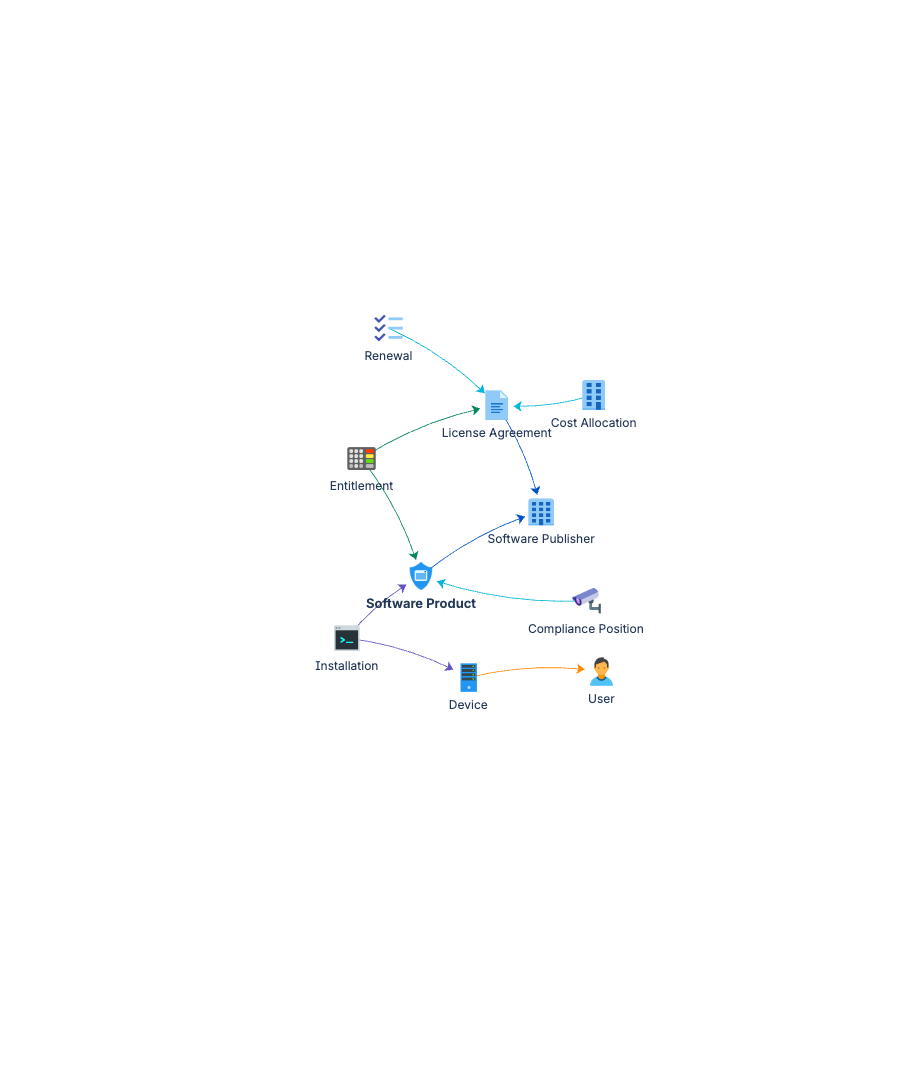
Software Publisher ──(publishes)──▶ Software Product
                                        │
                    ┌───────────────────┼───────────────────┐
                    ▼                                       ▼
           License Agreement                          Installation
                    │                                       │
                    ▼                                       ▼
              Entitlement                                Device
                    │                                       │
                    └───────────┐       ┌───────────────────┘
                                ▼       ▼
                         Compliance Position
                                │
                    ┌───────────┴───────────┐
                    ▼                       ▼
               Renewal               Cost Allocation
Documentation
Quick Start Guide Deployment guide covering the full software lifecycle chain, from publishers and products through to installations, compliance positions, and vendor audit preparation.
Governance Playbook Licence compliance review practices, renewal management cadence, and cost optimisation guidance.
Forms Specification Form layouts for all ten software asset management object types.