Core schema
Core schema
Every JSM LaunchPad schema needs to know about people, teams, and locations. Core Schema defines those shared building blocks once, so you never duplicate them.
Deploy this first if you plan to use multiple schemas. Standard CMDB, Vendor Management, Workforce Management: they all reference Core Schema objects rather than maintaining their own copies. One source of truth, shared everywhere.
What you get
| Object Type | Purpose | Key Attributes |
|---|---|---|
| Person | Individual staff members and contacts | Name, email, department, job title, manager |
| Team | Functional groups that own services or infrastructure | Name, team lead, department |
| Department | Organisational divisions | Name, code, head, parent department, cost centre |
| Location | Physical sites and offices | Name, type, address, city, country, region |
| Vendor | External suppliers and service providers | Name, type, website, relationship owner, status |
| Application | Software systems used across the organisation | Name, type, vendor, owner, criticality |
| Cost Centre | Financial tracking for budgets and chargebacks | Code, name, owner, status |
7 object types · 6 reference types
Together, these seven object types form your organisational directory: people belong to departments and work at locations, teams sit in departments, vendors provide applications, and cost centres fund departments.
Pro tip: Core Schema is designed as a foundation layer. You do not need to populate every object type on day one. Start with Person and Team, then add the rest as your CMDB matures.
When to use this schema
Deploy Core Schema first if you intend to use two or more schemas side by side (for example, Standard CMDB alongside Vendor Management). The larger schemas reference Core Schema objects instead of duplicating organisational data.
If you only need a single schema, you can skip Core entirely. The standalone templates (Standard CMDB, Enterprise IT, and others) include their own organisational objects. Core becomes valuable when you want a single, shared directory that multiple schemas point back to.
Not sure which path fits? See Which Schema Should I Choose?
Schema at a glance
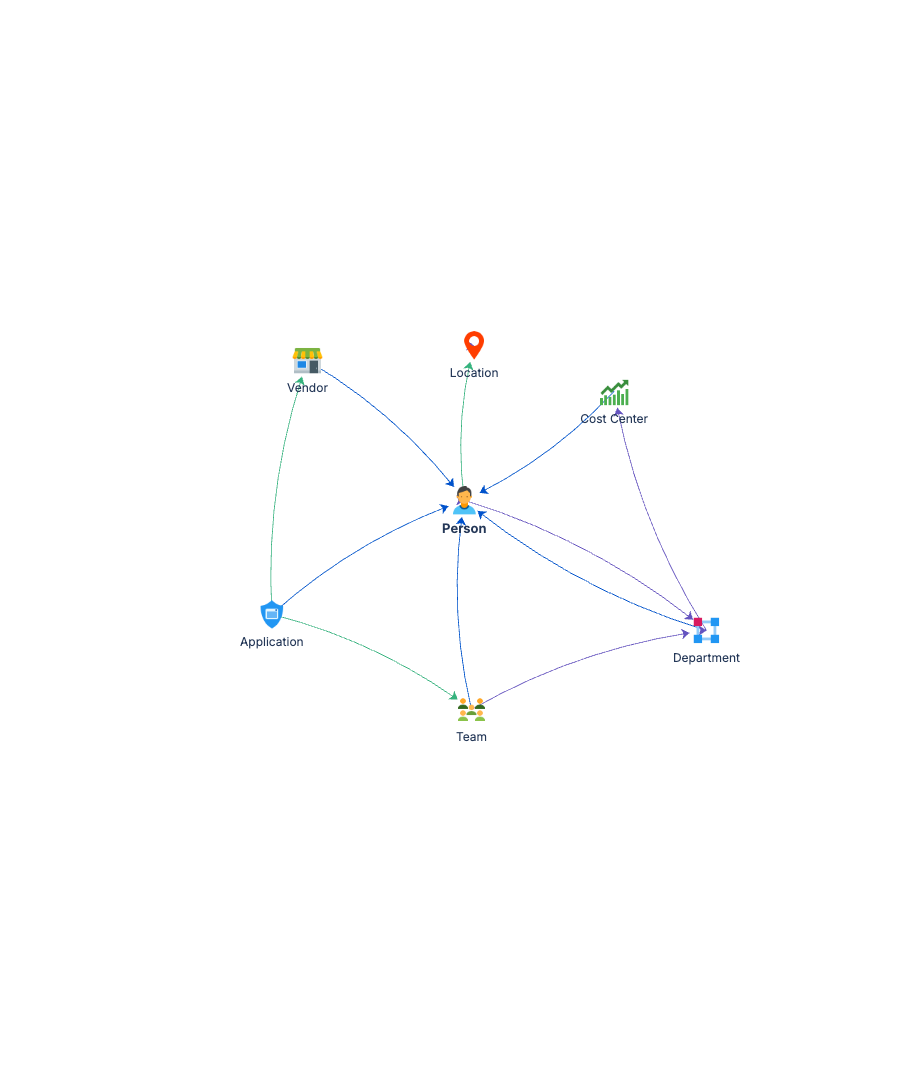
Team ──(Part Of)──▶ Department
Person ──(Member Of)──▶ Department
Person ──(Works At)──▶ Location
Application ──(Provides)──▶ Vendor
Application ──(Owned By)──▶ Person
Department ──(Funded By)──▶ Cost Centre
Seven object types, tightly connected. Other schemas reference Person, Team, Vendor, and Location rather than recreating them.
Documentation
Quick Start Guide Step-by-step deployment guide covering all seven object types, relationship configuration, and initial data population.
Governance Playbook Ownership model, review cadence, and data quality practices for the foundational schema that other schemas depend on.
Forms Specification Form layouts for all seven object types. Field configurations ready to apply in Assets.