Documentation management
Documentation management
Documentation looks after itself, right? You publish it, it sits there, it helps people. Except it does not. Documentation drifts. The JSON changes but the page still says the old value. A capability gets deprecated but the guide still recommends it. A screenshot shows a UI that was redesigned three months ago. The page looks polished, reads well, and is factually wrong.
Documentation Management treats your documentation library as operational content that needs governance, not a folder of files that somebody checks on when they remember. It tracks page ownership, review cadences, validation status, capability claims, media assets, and release readiness, so you always know which pages are current, which need attention, and which are blocking a release.
What you get
| Object Type | Purpose | Key Attributes |
|---|---|---|
| Schema | Reference data: deployed LaunchPad schema templates that documents cover | Schema Name, Version, Prefix, Object Type Count, Status, Deploy Date |
| Document | Core object: each documentation page with ownership, editorial status, and validation status | Title, Owner, Section, Tier, Editorial Status, Validation Status, Last Reviewed, Review Cadence |
| Validation Run | Discrete validation passes (JSON alignment, AQL verification, capability checks) | Document, Validation Type, Run Date, Validator, Result, Findings Count, Notes |
| Capability Claim | Factual claims in documentation that can drift from product reality | Document, Claim Text, Claim Type, Source Feature, Status, Last Verified, Verified By |
| Media Asset | Screenshots, diagrams, and GIFs with status tracking and placement | Document, Asset Type, File Name, Placement, Status, Captured Date, Alt Text |
| Review Cycle | Scheduled and ad hoc review events with outcomes | Document, Review Type, Reviewer, Scheduled Date, Completed Date, Outcome |
| Release Gate | Readiness checkpoints before documentation can be released | Document, Gate Name, Gate Type, Blocking, Status, Assigned To, Due Date |
7 object types · 2 reference types
Pro tip: Filter your Document objects by "Published + Unchecked" to find the pages most likely to contain outdated claims. These are the ones your users are reading right now, and nobody has verified them recently.
When to use this schema
This schema is for any team that manages a documentation library, knowledge base, runbook collection, or governed content set where accuracy matters. Deploy it when:
-
Documentation must stay aligned with product behaviour, platform capabilities, or production configuration (JSON templates, AQL queries, automation rules)
-
Multiple contributors write and maintain content, and you need clear ownership and review accountability
-
Compliance or quality standards require an audit trail for content accuracy and review cadence
-
You publish documentation in release cycles and need readiness gates before content goes live
If your docs are a handful of internal notes that change rarely, you probably do not need this. If your docs are a product in their own right, with claims that must be verified against reality, this is the schema for that.
Not quite right? If you only need to track software systems and services without documentation governance, Core Schema covers that. If your focus is IT asset management rather than content management, look at Standard CMDB or Enterprise IT CMDB.
Schema at a glance
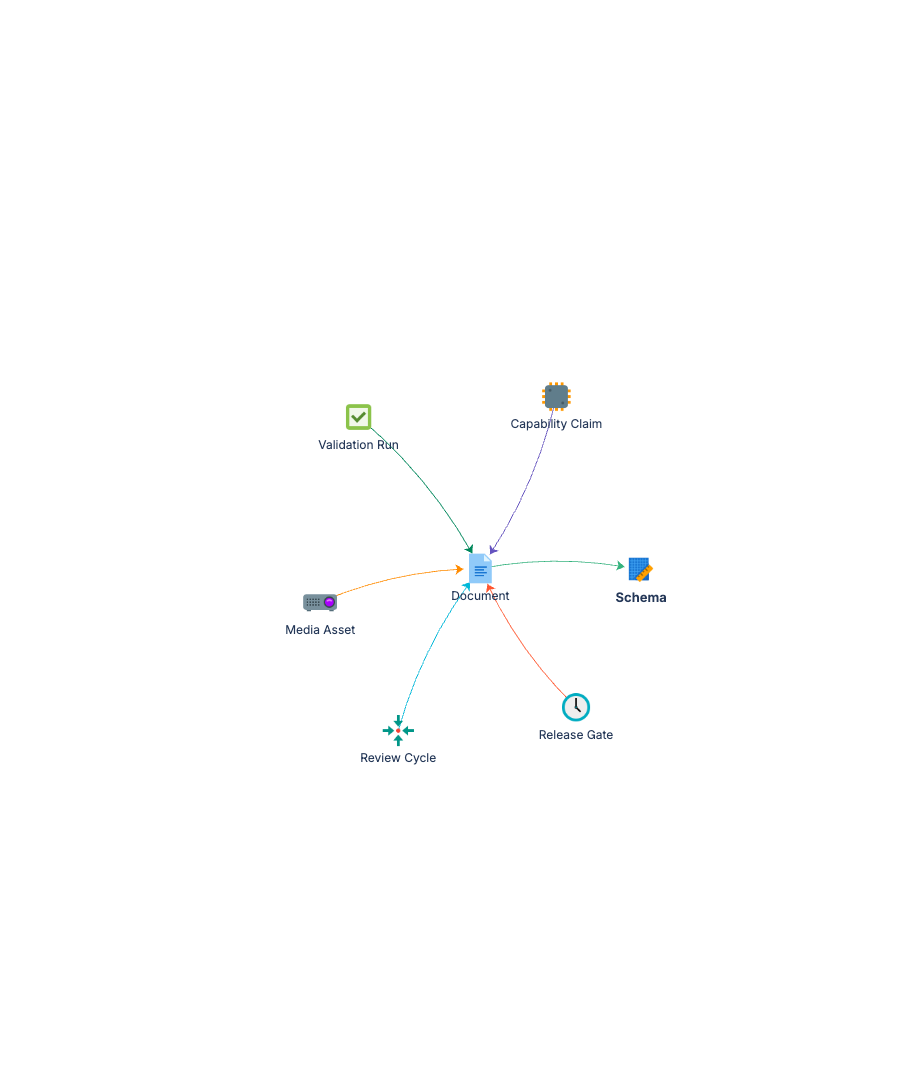
Schema ◀──(Applies To)── Document
                            │
        ┌───────────┬───────┼───────────┬───────────┐
        ▼           ▼       ▼           ▼           ▼
 Validation Run  Capability  Media    Review     Release
                  Claim      Asset    Cycle       Gate
The Document object type is the centre of the model. Everything else connects to it: validation runs verify it, capability claims belong to it, media assets illustrate it, review cycles govern it, and release gates control when it ships.
Documentation
Quick Start Guide Deployment guide covering all seven object types: schema references, document records, validation runs, capability claims, media assets, review cycles, and release gates.
Governance Playbook Review cadence management, two-dimensional status model (editorial and validation), capability claim verification practices, and release readiness gating.
Forms Specification Form layouts for all seven documentation management object types.
Design details: status model, integrations, and use cases
The two-dimensional status model
Most documentation systems have one status field. A page is either draft or published. That is not enough.
A page can be published and factually wrong. It passed editorial review, the grammar is fine, the formatting is correct, but the JSON it references was updated last week and nobody checked. Or a capability claim describes behaviour that was changed two releases ago. The page is published. It is also invalid.
Documentation Management separates these into two independent dimensions:
Editorial Status tracks where the page is in the content lifecycle:
- Draft
- In Review
- Published
- Archived
Validation Status tracks whether the page is factually correct:
- Unchecked
- JSON Validated
- Capability Verified
- AQL Verified
- Fully Validated
These are independent. A page can be "Published + Unchecked" (live but not yet verified against production), "Draft + JSON Validated" (content is being written but the technical claims have been checked), or any other combination. This is the key design insight: editorial quality and factual accuracy are separate concerns, and conflating them hides problems.
How it connects to other schemas
The Schema object type provides structured references to the LaunchPad schemas that each document covers. Rather than a free-text field saying "this page is about Core Schema", the Schema object holds the actual schema metadata (name, version, prefix, object type count) and the document links to it via the Applies To reference type.
When deployed alongside Core Schema, people references on Document objects (Owner, Last Reviewed By) could be converted from text attributes to object references pointing at Person objects. This gives you proper relationship-based ownership rather than names typed into text fields.
The Documented By reference type works in reverse too: from any Schema object, you can query which documents cover it, giving you a complete coverage map of your documentation library.
Common use cases
Documentation library governance. Track every page in your docs site with ownership, editorial status, and validation status. Know at a glance which pages are current, which are stale, and which have no owner.
Capability claim verification. Log every factual claim your documentation makes about product behaviour, platform capabilities, or configuration. When the product changes, query which claims need re-verification.
Review cadence management. Set review cadences (Monthly, Quarterly, Biannual, Annual, Ad Hoc) per document and track review cycles with outcomes. No more guessing when a page was last checked.
Release readiness tracking. Define release gates (blocking and non-blocking) that must be satisfied before documentation ships. A blocking gate stops the release. A non-blocking gate flags a known gap but lets you proceed.
Media asset management. Track screenshots, diagrams, and GIFs with their placement, status, and the document they illustrate. When the UI changes, query which media assets need updating.
Audit trail for content accuracy. Every validation run is recorded: what was checked, when, by whom, and what the result was. When someone asks "how do we know this page is correct?", you have the answer.
What it does not do
This schema does not store your documentation content. It does not replace your CMS, wiki, Confluence space, or docs site. The actual words, images, and pages live where they always lived.
What it tracks is the operational metadata around those documents: who owns them, when they were last reviewed, whether their claims have been verified, what media assets they contain, and whether they are ready to ship. Think of it as the governance layer that sits alongside your content, not inside it.