Workforce management
Workforce management
Your new starter arrives on Monday. IT needs to provision a laptop, grant access to six applications, and confirm two certifications are current. Your HR team tracks some of that in a spreadsheet, IT tracks the rest in email threads, and nobody is quite sure what the contractor who left last month still has access to. This schema closes those gaps.
Workforce Management gives you a person-centric CMDB that ties organisational structure (departments, locations, roles) to the people who fill it (employees and contractors) and the resources they use (IT assets, software access, skills, and certifications). One query answers "what does this person have?" and one offboarding trigger recovers it all.
What you get
| Object Type | Purpose | Key Attributes |
|---|---|---|
| Department | Organisational units and cost centres | Name, Code, Cost Center, Status |
| Location | Physical work locations and offices | Name, Address, City, Country, Type, Capacity |
| Role | Standardised job positions | Title, Level, Salary Band, Open Positions |
| Skill | Competencies employees can acquire | Name, Category, Status |
| Certification | Professional credentials with validity periods | Name, Issuer, Validity Period, Renewal Required |
| Employee | Full-time and part-time staff | Name, Email, Employee ID, Department, Location, Role |
| Contractor | External consultants and temporary workers | Name, Email, Company, Start/End Date |
| Employee Skill | Skill assignments with proficiency tracking | Employee, Skill, Proficiency Level, Verified Date |
| Employee Certification | Certification records with expiry dates | Employee, Certification, Issue/Expiry Date, Certificate Number |
| IT Asset | Physical equipment (laptops, monitors, phones) | Asset Tag, Make, Model, Serial Number, Assigned To |
| Software Access | Application access grants per person | Application, Access Level, Granted Date, Granted By |
| Emergency Contact | Emergency contact details for each employee | Contact Name, Relationship, Phone |
12 object types · 3 reference types
Pro tip: Start with Departments, Locations, and Roles first. These are the organisational scaffolding that every Employee and Contractor record references. Get the structure right, and the people records practically fill themselves.
When to use this schema
Deploy Workforce Management if your organisation needs to:
-
Automate Joiner-Mover-Leaver (JML) processes, so onboarding triggers provisioning and offboarding triggers recovery
-
Track which employees and contractors have access to which applications, at what level
-
Maintain a skills inventory for gap analysis and training planning
-
Monitor certification expiry dates and trigger renewal workflows
-
Know exactly which IT assets are assigned to whom, and recover them cleanly at termination
This schema is particularly valuable for organisations with 100 or more employees, or any team running SOC 2 or ISO 27001 audits where demonstrating access controls matters.
Not quite right? If you only need IT infrastructure tracking (servers, networks, applications) without the people layer, look at Standard CMDB or Core Schema. If you need security-focused asset tracking with vulnerability management, try Cybersecurity. If you need licence compliance and software lifecycle tracking, Software Asset Management is a better fit.
Schema at a glance
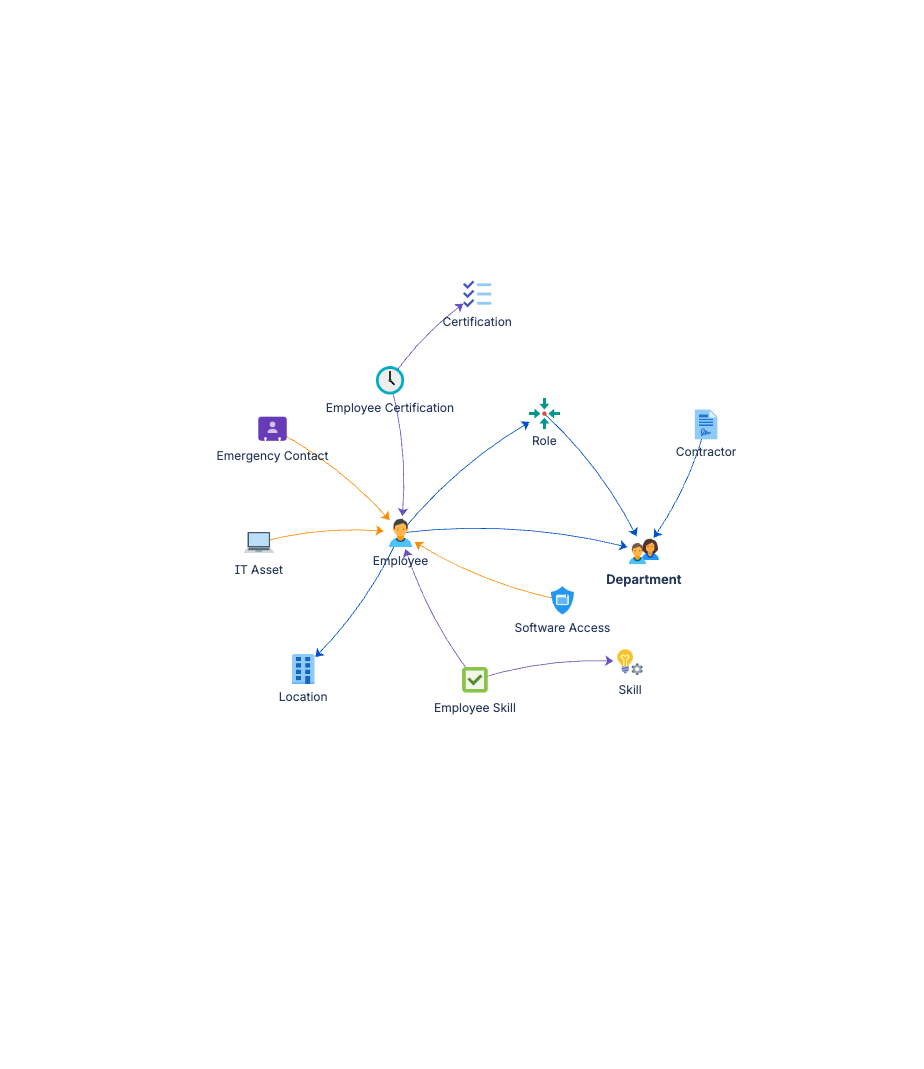
Tier 1: Organisational Structure
  Department ──(Works In)──▶ Location
  Role ──(Works In)──▶ Department

Tier 2: Competency Definitions
  Skill
  Certification

Tier 3: People
  Employee ──(Works In)──▶ Department, Location, Role
  Contractor ──(Works In)──▶ Department

Tier 4: Person-Specific Records
  Employee Skill ──(Has Skill)──▶ Employee, Skill
  Employee Certification ──(Has Skill)──▶ Employee, Certification
  IT Asset ──(Assigned To)──▶ Employee
  Software Access ──(Assigned To)──▶ Employee
  Emergency Contact ──(Assigned To)──▶ Employee
Documentation
Quick Start Guide Deployment walkthrough covering employee and contractor onboarding, skills tracking, certification management, and IT asset assignment. Includes attribute references for all twelve object types.
Governance Playbook Workforce data review cadence, certification expiry management, access review practices, and contractor lifecycle governance.
Forms Specification Form layouts for all twelve workforce management object types, including onboarding, offboarding, and access request forms.