Cybersecurity
Cybersecurity
Your vulnerability scanner found 47 critical findings last week. But when the security team asks which of those affect customer-facing applications, who owns them, and which are covered by existing controls, nobody has a quick answer. The data exists in three different tools, and connecting it takes hours. This schema puts it all in one place.
Cybersecurity extends Core Schema to manage the security layer of your CMDB: assets with security attributes, vulnerabilities tracked against affected systems, controls mapped to compliance requirements, and a live risk register that links to real infrastructure. When something is patched, the record updates. When a new requirement lands, you can see what controls already cover it.
What you get
| Object Type | Purpose | Key Attributes |
|---|---|---|
| Security Asset | IT assets with security-relevant attributes | Name, Type, Criticality, Owner, Data Classification, Status |
| Vulnerability | Known security weaknesses affecting assets | CVE ID, Severity, CVSS Score, Affected Asset, Remediation Status, Remediation Due |
| Security Control | Safeguards and countermeasures in place | Name, Category, Framework, Implementation Status, Owner, Next Assessment |
| Risk | Identified risks with likelihood and impact scoring | Name, Category, Likelihood, Impact, Risk Score, Treatment |
| Compliance Requirement | Regulatory and framework obligations | Requirement ID, Framework, Description, Mapped Controls, Compliance Status |
5 object types · 4 reference types
Pro tip: This schema extends Core Schema. Deploy Core first to get Person, Team, and Application objects. Security Assets and Vulnerabilities reference those objects, so your security records automatically inherit organisational context.
When to use this schema
Deploy Cybersecurity alongside Core Schema if your organisation needs to:
-
Track vulnerabilities against specific assets and know which teams are responsible for remediation
-
Map security controls to compliance frameworks (ISO 27001, SOC 2, NIST, CIS) and report coverage gaps
-
Maintain a live risk register that links risks to real infrastructure rather than a standalone spreadsheet
-
Connect compliance requirements to the controls that satisfy them and identify gaps
This schema is particularly useful for organisations undergoing compliance certification or those with a dedicated security function that needs CMDB-level traceability.
Not quite right? For general IT infrastructure tracking without security depth, the Standard CMDB covers servers, applications, and networks. For workforce access management and identity governance, Workforce Management tracks who has access to what.
Schema at a glance
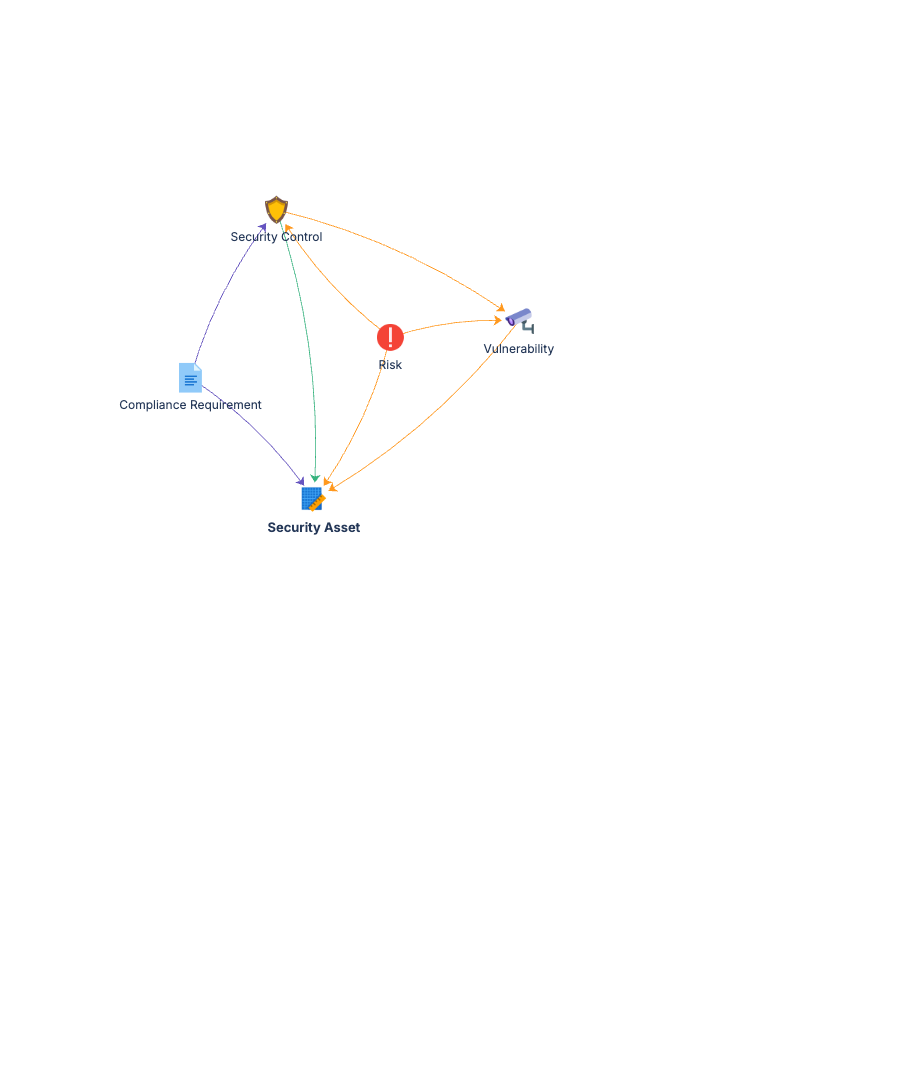
Core Schema (Person, Team, Application)
        │
        ▼
Security Asset ◀──(Affects)── Vulnerability
Security Asset ◀──(Protects)── Security Control
Security Control ◀──(Satisfied By)── Compliance Requirement
Risk ──(Mitigated By)──▶ Security Control
Five object types, tightly connected. Reference types link the security layer to your infrastructure. One query answers: "which assets are exposed, which controls apply, and are we compliant?"
Documentation
Quick Start Guide Deployment guide for all five object types. Covers Core Schema integration, initial asset and vulnerability population, and control mapping to compliance frameworks.
Governance Playbook Security review cadence, vulnerability lifecycle management, risk register maintenance, and compliance tracking practices.
Forms Specification Form layouts for security assets, vulnerabilities, controls, risks, compliance requirements, and related object types.