Vendor management
Vendor management
You have seventeen vendors. Three contracts renewing in the next 90 days. A risk assessment that was last updated before the current account manager joined. And when the auditors ask for a summary of your third-party risk posture, someone has to spend two days pulling it together from email threads and spreadsheets. This schema puts that information in one place.
Vendor Management tracks the full vendor lifecycle: onboarding, contracts, products and services, risk assessments, SLA monitoring, performance reviews, spend tracking, and issue management. Every vendor's full relationship with your organisation lives in a single view.
What you get
| Object Type | Purpose | Key Attributes |
|---|---|---|
| Vendor | Third-party vendors and suppliers | Vendor Name, Vendor Type, Strategic Importance, Status |
| Contact | Key contacts at vendor organisations | Full Name, Vendor, Role, Email, Status |
| Contract | Vendor contracts and agreements | Contract Name, Vendor, Contract Type, Total Value, Start Date, End Date, Status |
| Product/Service | Products and services provided by vendors | Name, Vendor, Type, Category, Annual Cost, Status |
| Risk Assessment | Vendor risk evaluations | Assessment Name, Vendor, Overall Risk Level, Assessment Type, Status |
| Risk Factor | Specific risk items identified in assessments | Risk Name, Assessment, Category, Risk Score, Status |
| Performance Review | Periodic vendor performance evaluations | Review Name, Vendor, Review Period, Overall Score, Status |
| SLA | Service level agreements with vendors | SLA Name, Contract, Metric, Target, Measurement Period, Status |
| SLA Performance | Tracking of SLA compliance over time | Period Name, SLA, Period, Actual, Target Met |
| Spend | Vendor spending records | Description, Vendor, Period, Amount, Category, Status |
| Issue | Vendor-related issues and incidents | Issue Title, Vendor, Issue Type, Priority, Status |
11 object types · 4 reference types
Pro tip: Start by importing your top ten vendors by spend. Add their primary contacts, any contracts renewing in the next 12 months, and one risk assessment each. That gives you immediate visibility on what matters most, before you tackle the full estate.
When to use this schema
Deploy Vendor Management if your organisation:
-
Works with five or more external vendors and needs structured tracking of contracts, performance, and risk
-
Runs periodic vendor reviews or due diligence processes and needs a data trail
-
Has compliance or audit requirements around third-party risk (SOC 2, ISO 27001)
-
Manages contracts with overlapping renewal dates and wants proactive alerts
-
Needs to report on vendor spend by category or cost centre
This schema works well alongside Core Schema for shared organisational objects (teams, cost centres, locations). If your vendor relationships are primarily software licences, Software Asset Management may be a better fit.
Schema at a glance
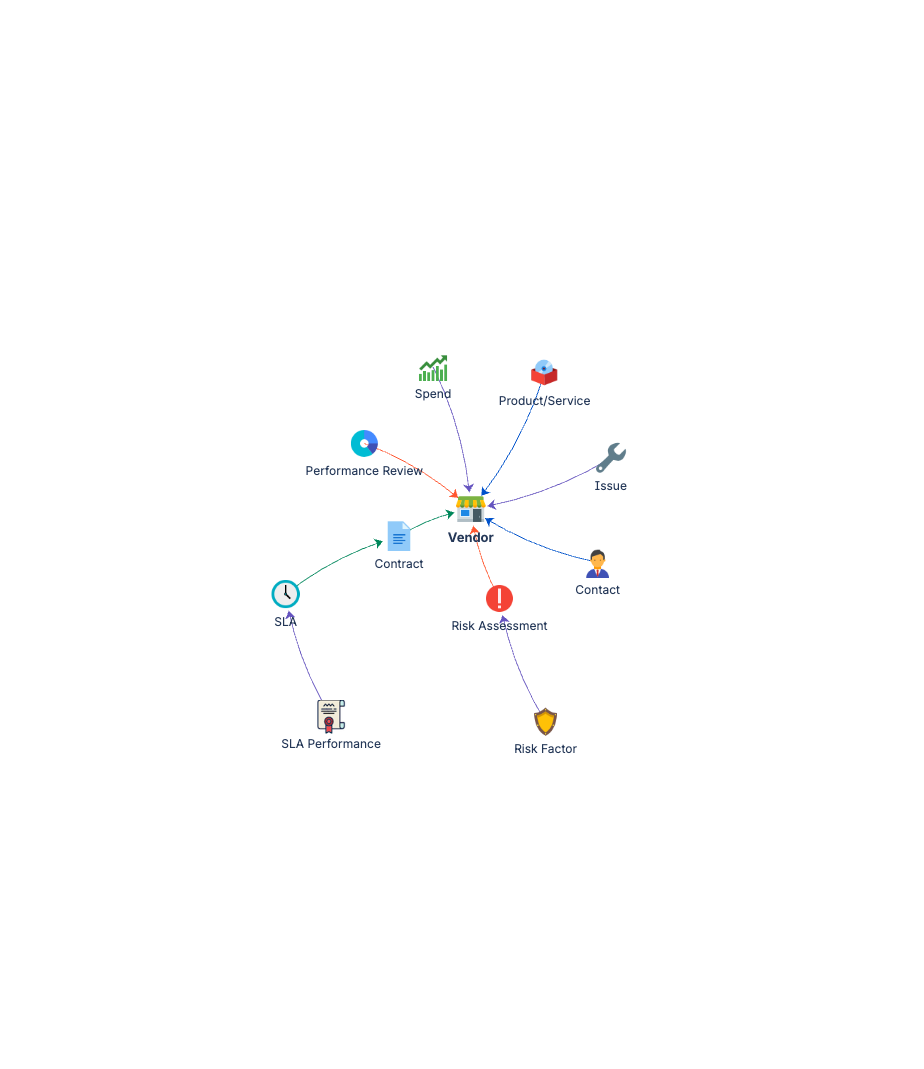
Vendor ◀──(Provided By)── Contact
Vendor ◀──(Governed By)── Contract
Vendor ◀──(Provided By)── Product/Service
Vendor ◀──(Assessed For)── Risk Assessment
Vendor ◀──(Assessed For)── Performance Review
Vendor ◀──(Related To)── Spend
Vendor ◀──(Related To)── Issue
Contract ◀──(Governed By)── SLA
SLA ◀──(Related To)── SLA Performance
Risk Assessment ◀──(Related To)── Risk Factor
Eleven object types, structured around the vendor as the central record. From a single vendor page you can see contracts, contacts, risk status, performance history, and open issues.
Documentation
Quick Start Guide Deployment guide covering vendor onboarding, contract setup, risk assessment configuration, and performance review workflows.
Governance Playbook Vendor review cadence, contract renewal management, risk reassessment practices, and performance benchmarking.
Forms Specification Form layouts for all eleven vendor management object types.