Service catalogue
Service catalogue
Your service desk handles dozens of requests every day, but can anyone actually explain which services you offer, who owns them, and what response times apply? Most teams cannot. The Service Catalogue fixes that.
This schema organises your IT services into a structured, browsable catalogue. Business services, service offerings, support teams, service levels: all connected so that every service has clear ownership, defined SLAs, and documented request processes. Customers see what they can request. Support teams see what they are responsible for. Management sees the full picture.
What you get
| Object Type | Purpose | Key Attributes |
|---|---|---|
| Business Service | High-level services visible to the organisation | Name, description, owner, status, criticality |
| Service Category | Groupings that organise services for browsing | Category name, description, display order, status |
| Service Offering | Specific requestable items within a business service | Offering name, description, fulfilment time, price |
| Service Level | SLA definitions with response and resolution targets | Level name, availability target, response time, resolution time, support hours |
| Support Team | Teams responsible for delivering and supporting services | Team name, email, Slack channel, escalation path |
| Service Owner | Individuals accountable for a service end to end | Full name, email, department, status |
| Knowledge Article | Documentation linked to services for support reference | Title, URL, article type, service, last updated |
| Service Request Type | Jira Service Management request types mapped to business services | Request type name, description, service, approval required |
8 object types · 7 reference types
Together, these define the full lifecycle of a service: what it is, who owns it, what levels of support apply, how users request it, and where the documentation lives.
Pro tip: Start with your five most-used services. Define those fully (business service, offering, level, owner, support team) before expanding to the rest. A small, complete catalogue is far more useful than a large, half-finished one.
When to use this schema
Deploy the Service Catalogue if:
-
You need to publish a structured catalogue of IT services for your organisation.
-
Service ownership is unclear and you want explicit accountability for each service.
-
You are connecting service offerings to SLAs and need the relationship modelled in Assets.
-
Your service desk team needs a single reference for what is supported and by whom.
This schema works well alongside Core Schema (for shared organisational objects) and SLA Management (for enforcement and escalation). If your focus is infrastructure tracking rather than service delivery, look at the Standard CMDB instead.
Not sure which schema fits? See Which Schema Should I Choose?
Schema at a glance
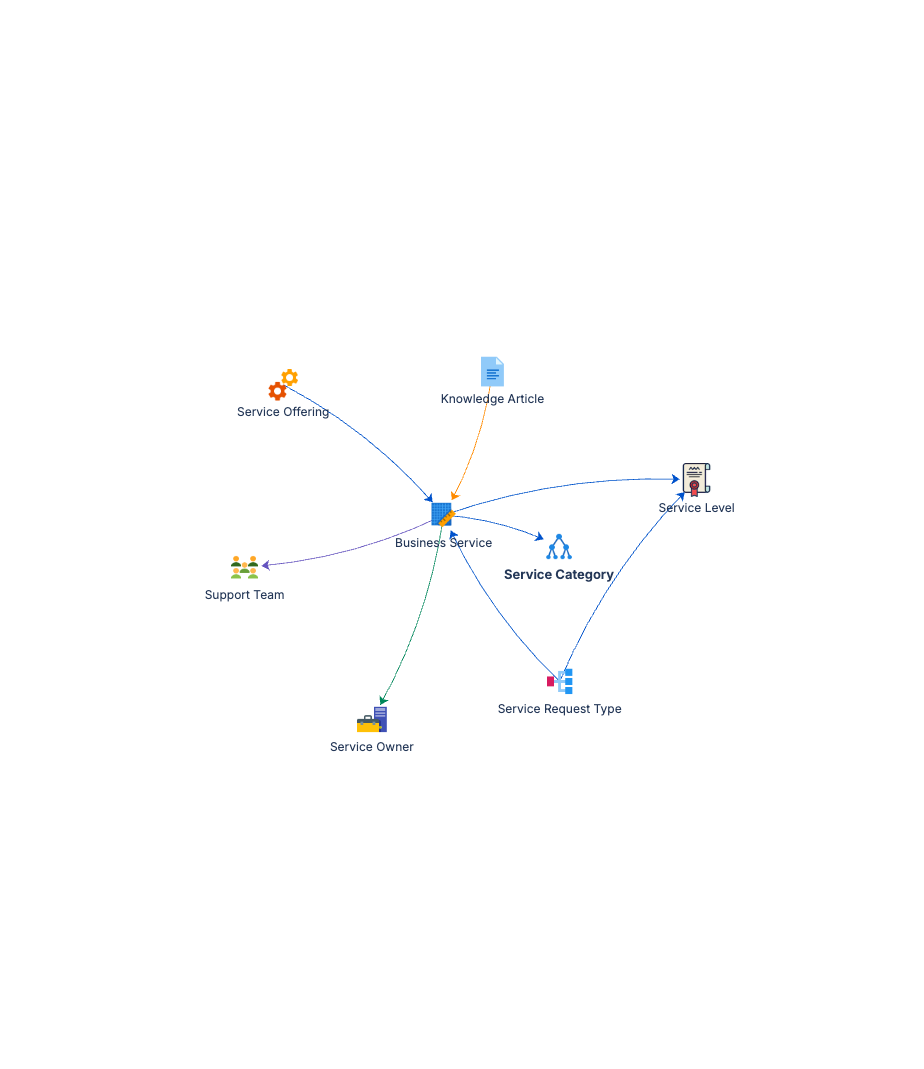
Service Category ──(Contains)──▶ Business Service
Business Service ──(Has)──▶ Service Offering ──(Governed By)──▶ Service Level
Business Service ──(Owned By)──▶ Service Owner
Business Service ──(Supported By)──▶ Support Team
Service Offering ──(Requested Via)──▶ Service Request Type
Business Service ──(Documented In)──▶ Knowledge Article
Eight object types modelling the full service delivery chain, from high-level categories down to individual request types.
Documentation
Quick Start Guide Step-by-step deployment guide covering service hierarchy, ownership assignment, and SLA linkage.
Governance Playbook Service lifecycle management, catalogue review cadence, and practices for keeping service definitions current.
Forms Specification Form layouts for all eight service catalogue object types. Field configurations ready to apply in Assets.