Priority matrix
Priority matrix
Every incident gets triaged. But when "everything is a P1" and agents set priority based on gut feel, your SLA reporting becomes meaningless and your escalation rules fire on the wrong tickets. The Priority Matrix replaces subjective judgement with a structured, ITIL-aligned lookup that maps impact and urgency to a defined priority level, every time.
Four object types form a classic prioritisation model: Impact Levels define how broadly something affects the business, Urgency Levels define how quickly it needs resolution, Priority Rules map each combination to a resulting Priority Level, and Priority Levels carry the response and resolution targets that drive SLA enforcement.
What you get
| Object Type | Purpose | Key Attributes |
|---|---|---|
| Priority Level | The output: priority tiers with SLA targets | Name, Response Target, Resolution Target, Colour Code, Status |
| Impact Level | How broadly the issue affects the organisation | Name, Scope (Organisation-wide to Individual), Examples |
| Urgency Level | How quickly it needs resolution | Name, Time Sensitivity (Immediate to Scheduled), Business Context |
| Priority Rule | The matrix logic: one rule per impact/urgency combination | Name, Impact, Urgency, Resulting Priority, Override Allowed |
4 object types · 2 reference types
Pro tip: A standard 3x3 matrix (3 impact levels, 3 urgency levels) produces 9 Priority Rules and 19 total records. That is the entire schema populated. Start there, and tune the matrix after a month of real incident data.
When to use this schema
Deploy Priority Matrix if your organisation needs to:
-
Formalise ITIL-style impact/urgency prioritisation so every agent assigns the same priority for the same situation
-
Tie SLA targets directly to priority levels with documented response and resolution commitments
-
Support automation rules that auto-assign priority based on structured matrix data rather than hardcoded conditions
-
Provide an audit trail for priority decisions that can be reviewed and governed
This schema pairs naturally with SLA Management, which handles what happens after priority is assigned: target enforcement, escalation rules, and breach prevention.
Not quite right? If you need full SLA lifecycle management (tracking, breach alerts, escalation), deploy the SLA Management schema alongside this one. If your prioritisation is simple enough that Jira's built-in priority field meets your needs, you may not need this schema at all.
Schema at a glance
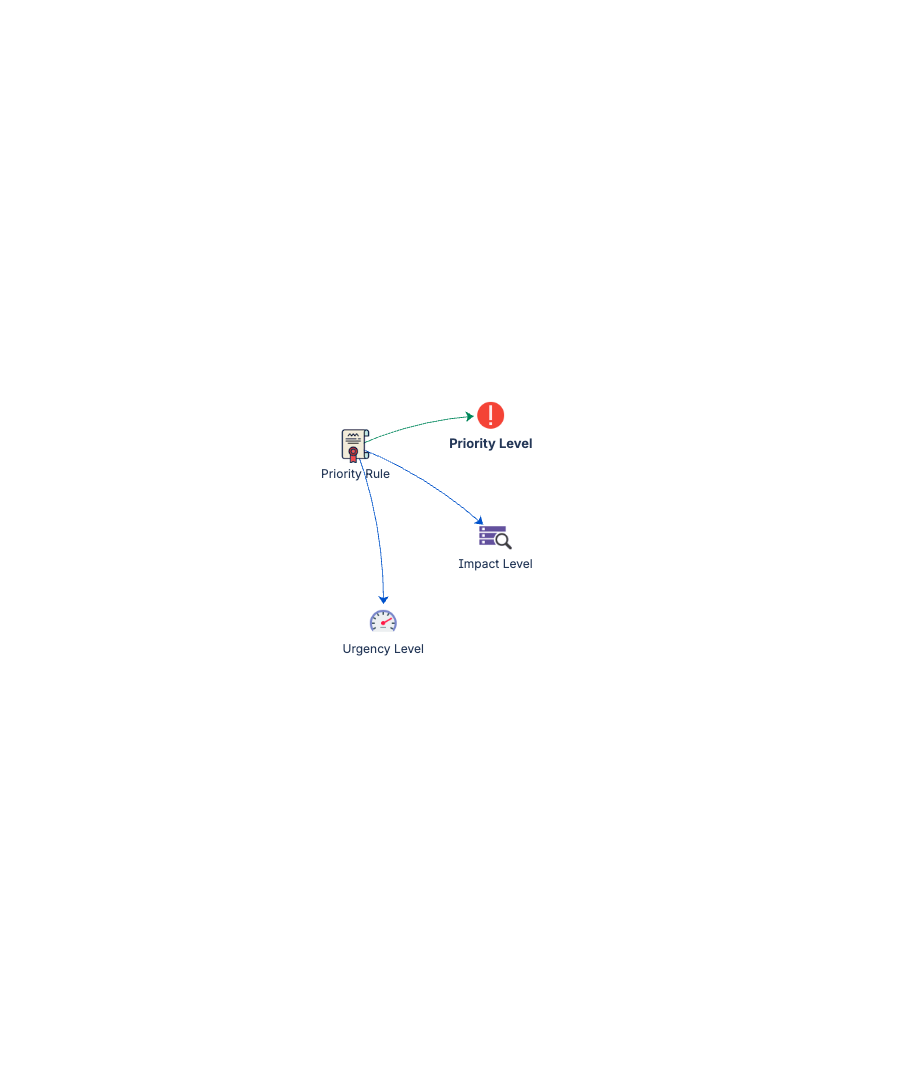
Impact Level ──(Determines)──▶ Priority Rule ──(Maps To)──▶ Priority Level
                                     ▲
Urgency Level ─(Determines)──────────┘

The 3x3 Matrix:
                    High        Medium      Low
                    Urgency     Urgency     Urgency
High Impact         P1          P1          P2
Medium Impact       P2          P3          P3
Low Impact          P3          P4          P4
Two reference types encode the logic: Determines (blue) links impact and urgency to each rule, and Maps To (green) links each rule to its resulting priority level.
Documentation
Quick Start Guide Deployment walkthrough covering the full 3x3 matrix setup: priority levels, impact levels, urgency levels, all 9 rules, and integration with Jira Service Management ticket workflows.
Governance Playbook Priority matrix review cadence, override monitoring, rule adjustment practices, and alignment with SLA targets.
Forms Specification Form layouts for priority levels, impact levels, urgency levels, and priority rules.